Speak,it types.
A voice dictation toolfor any app on your Mac or PC.
Fully local, works with no internet connection, and tuned for Indian-accented English — the voices most dictation tools still get wrong.
A short point of view from us on what actually changed in speech recognition — and on the parts that matter, that didn't change at all. But first, here's the work:
vaak, in your apps.
Press Alt + Space in any focused app, speak, release. vaak types the sentence right where your cursor is — no window to summon, no app to switch to.
drag →In any editor
Schedule a call with Praveen and Lakshmi at 4 pm. Names spelled your way, the first time.
On a flight
No wifi, no problem. The Whisper model runs on your machine — dictation keeps working at 30,000 feet.
In your standup
Speak your update at the speed of thought. vaak transcribes it locally and pastes it into Slack, Notion, or Linear.
In your history
Every transcript is saved on your device, searchable, never uploaded anywhere.
Speech has always moved in four stages.
The word vaak
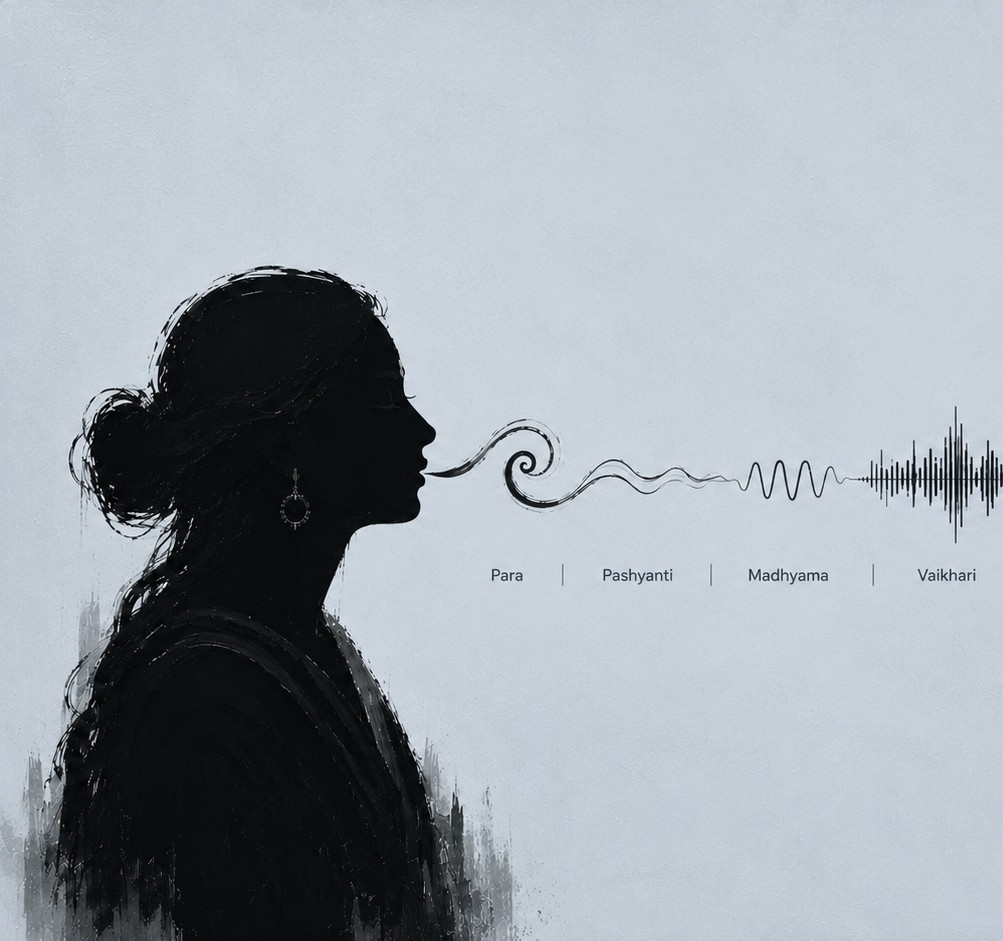
Sanskrit grammarians described thought becoming word in four stages — para, pashyanti, madhyama, vaikhari — from the unformed idea to the sound that leaves your mouth.
vaak, the app, picks up the thread at the last stage and carries it one step further: from spoken word to written text, without a server in between. The model runs on your machine, the audio never leaves it, and the typing happens right where your cursor is.
One team, one set of eyes, and nothing left to run on its own.
Para. Pashyanti.
Madhyama. Vaikhari.
From the unspoken thought to the word that leaves your mouth — and one step further, into written text. vaak picks up the thread at the last stage.
The thought before it has any shape. Nothing to transcribe yet — just an idea sitting in your head.
The idea takes on a shape you could describe. This is the moment you reach for Alt + Space.
Speech takes shape inwardly, becoming sound. vaak listens here — a local Whisper model turns it into words as you talk.
Uttered, manifest, heard. vaak types the finished sentence right where your cursor is.
Audio never leaves your device.
— vaak, v0.1.0
The Whisper model runs on your machine. No account, no server round-trip, no audio leaving your laptop — dictation keeps working on a flight with no wifi.
Most dictation tools are good at everything except the last 10 percent.
What changed
The dictation tools are very good now, and everyone has the same ones. A clean transcript, ten seconds after you stop talking: what used to take a careful retry takes one pass.
Which is why volume stopped being the hard part. Point a generic model at an Indian name and it gives you back the average of everything it has already seen. Competent enough, and instantly forgettable — Praveen becomes “proveen”, Lakshmi becomes “lucks me,” and the spelling never sticks.
Producing a clean transcript quickly, and getting a rough first version of almost anything in front of you.
Knowing which of those transcripts is actually any good — and having the nerve to stay quiet instead of guessing wrong.
vaak's model is adjusted to stay quiet when it's unsure, rather than guessing confidently and getting it wrong. The last ten percent is where the real work lives.
Built for how you work.
Everything dictation needs
One hotkey, everywhere. Alt + Space works in any focused app. No window to summon, no app to switch to. Text lands right where your cursor is — no copying, no switching windows.
Teach vaak a name or a piece of jargon once, and it spells it your way from then on. Every transcript is saved on your device, searchable, never uploaded anywhere. The four parts below are how it works.
Download vaakAlt + Space works in any focused app. No window to summon, no app to switch to.
Text lands right where your cursor is. No copying, no switching windows.
Teach it a name or a piece of jargon once, and it spells it your way from then on.
Every transcript is saved on your device, searchable, never uploaded anywhere.
Built small, built local.
Under the hood
vaak is a Rust + Tauri app, which means a small install and native performance. It lives quietly in the menu bar on macOS or the system tray on Windows, and the Whisper model runs locally on your machine.
There's no account, no server round-trip, and once it's installed, no network connection required. The whole point is that dictation keeps working when the internet doesn't.
- EEngine. Whisper, running locally on your machine.
- RRuntime. Rust + Tauri — small install, native performance.
- PPlatforms. macOS 14+ (Apple Silicon & Intel), Windows 10/11.
- NNetwork. None required, once installed.
Footprint: lives quietly in the menu bar / system tray.
Get vaak · v0.1.0
Download vaak.
It's an early, unsigned build, so macOS or Windows will ask you to confirm once before opening it. The steps are below — it takes under a minute.
Install & first-run setup.
Questions
macOS. Open the downloaded .dmg and drag vaak into Applications. Because vaak is self-signed (no paid Apple developer ID yet), macOS may show “Apple could not verify vaak is free of malware.” That's expected and harmless — you only allow it once. On macOS 15 Sequoia & newer: System Settings → Privacy & Security → scroll to Security → Open Anyway → Open. On macOS 14 and older: right-click vaak.app in Finder → Open → Open.
Windows. Run vaak_0.1.0_x64-setup.exe. If SmartScreen shows “Windows protected your PC,” click More info → Run anyway (the installer is unsigned for now). Grant microphone access when prompted, then press Alt + Space to start dictating.
Does vaak send my voice anywhere? No. Transcription runs on your machine with a local Whisper model. Which accents does it handle well? English, with particular attention to Indian accents, names, and code-switching.